You turn the key. Nothing happens. No engine sound, no click, no sign of life at all. It's frustrating, especially when you planned to use your cart today. The good news is that most golf carts that won't start can be fixed without a trip to the repair shop. The bad news is that there are several places to check, and you need to approach this methodically. But if you follow these steps in order, you'll either get your cart running or figure out exactly what you need professional help with.
Start With the Battery (It's the Culprit 80% of the Time)
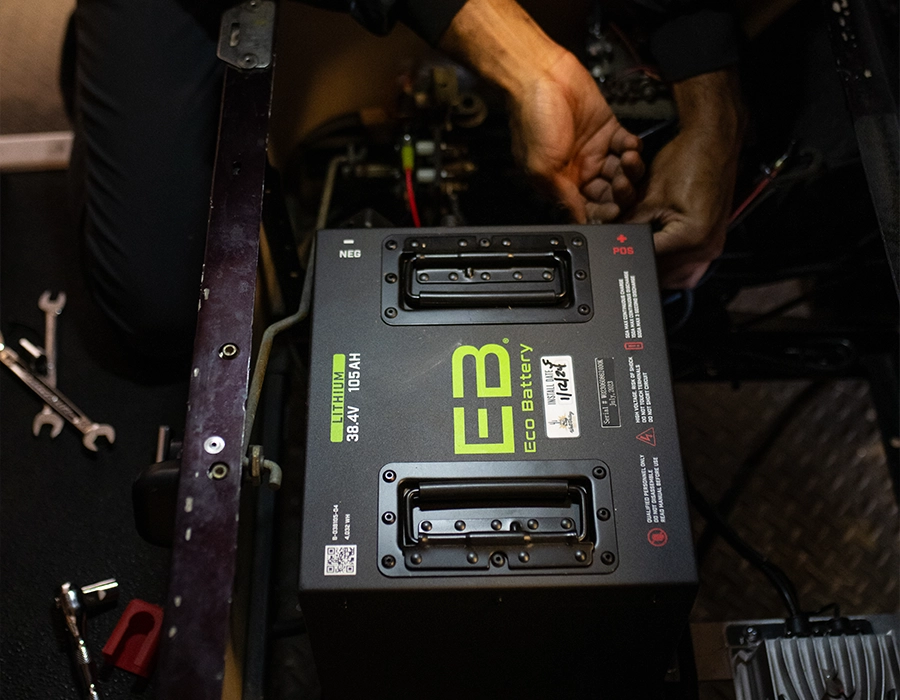
Your battery is the first place to look because it's responsible for everything electrical in your cart. If there's no power, nothing else matters. Check the charge level first. If your cart has been sitting for a few days or hasn't been used in a while, it may have simply discharged. Plug it in and let it charge fully. This can take 8 to 12 hours depending on your battery type. Some batteries will hold a charge longer than others, but if it's been weeks since you plugged it in, that's usually your answer. Look at the terminals next. Pop open your battery compartment and check the positive and negative cable connections. Are they loose? Even a slightly loose terminal can prevent power from flowing to the rest of the cart. Tighten them firmly, but don't force it. Check for corrosion. This is the grayish-blue crusty buildup you sometimes see around battery terminals. It's a sign of oxidation and can block electrical current. If you see corrosion, disconnect the cables (negative first, then positive) and clean the terminals with a soft brush and a baking soda solution (mix baking soda with a little water to form a paste). Scrub gently, rinse, and dry thoroughly before reconnecting. Check the water level. Lead-acid batteries need water to function properly. Open the battery caps and look inside. The water should cover the internal plates. If it's low, add distilled water until it just covers the plates. Don't overfill. If your battery is consistently low on water, it might be aging out and losing its ability to hold charge. Consider battery age. If your cart has been sitting unused for months, or if you inherited it and don't know how old the battery is, age could be the issue. Golf cart batteries last 4 to 6 years with proper care, sometimes longer. If yours is at that age and won't hold a charge, replacement might be the real fix. This is also a good time to think about whether you want to stay with traditional lead-acid batteries or upgrade. West Valley Golf Cars specializes in Lithium Ion battery upgrades that offer longer lifespan, faster charging, and better performance than traditional batteries.
Listen for the Click (The Solenoid Test)
Before you move on, try this diagnostic test: turn the key to the "on" position and press the accelerator. Do you hear a distinct clicking sound coming from under the hood? That click is the solenoid doing its job. The solenoid is a relay that transfers power from the battery to the motor. If you hear a click (even just one), the battery and ignition system have enough juice to communicate. If you hear nothing at all, no click, no buzz, no sound, you're looking at either a dead battery (go back and charge it longer) or something blocking power flow. If you hear rapid clicking, that usually means the battery is too weak to sustain power. Charge it more. If you hear one solid click and then nothing, the solenoid might be stuck or failing. Check the wiring around it for corrosion or loose connections. If the terminals look clean and tight, the solenoid itself might need replacement. If there's no click at all, power isn't reaching the solenoid. This points back to the battery or the ignition system.
The Key Switch (Simple But Surprisingly Effective to Check)
Turn the key slowly and pay attention to what happens on the dashboard. Do the lights come on? Does the charge indicator light up? If yes, your ignition switch is working. If no, if turning the key produces absolutely nothing on the dashboard, you've found your problem. Try jiggling the key gently while it's in the "on" position. Sometimes a worn key switch can be coaxed to make contact if you move it slightly. If that works temporarily, the switch needs replacement. It's usually not expensive, and it's straightforward enough that many people handle it themselves. If jiggling doesn't help and the dashboard stays dark, the ignition switch is likely bad. This is a professional job if you're not mechanically inclined, but it's one of the simpler repairs.
The Forward/Reverse Switch (Check Both Directions)
This one's easy to overlook, but it's worth testing. Try to move your cart in forward. Does it respond at all, even slowly? Now try reverse. If your cart only works in one direction or both directions feel weak and sluggish, the forward/reverse switch might be the issue. These switches wear out with use. Thousands of shifts will eventually take a toll. If you notice the switch feels loose or stuck in one position, or if the cart won't move in either direction despite the battery being charged, this switch probably needs replacing.
Check for Blown Fuses
Golf carts use fuses to protect electrical circuits, just like cars do. A blown fuse can cut power to critical starting components. Locate your fuse box (usually in the engine compartment or under the seat). Check your cart's manual for the exact location. Open it and look at the fuses. A blown fuse will look discolored, charred, or have a broken wire visible inside the clear plastic casing. If you find one that's blown, replace it with an identical fuse (same amperage rating). Then try starting the cart. Why do fuses blow? Usually it's a sign of an electrical overload or a short circuit somewhere in the system. If the new fuse blows again immediately, don't keep replacing them. You have a deeper electrical problem that needs professional diagnosis.
Motor Issues (The Less Common Culprit)
If you've worked through all of the above and your cart still won't start, the issue might be with the motor itself. Before assuming the worst, try this: use a screwdriver to access the motor and look for a small red reset button near the main power supply. Press it, reassemble, and try starting again. In some cases, the motor has a thermal overload protector that trips if the motor gets too hot, and this button resets it. If that doesn't work, the motor may be burned out. This typically happens from:
- Pushing the cart beyond its weight capacity - Motor running continuously without proper cooling - Internal wear on brushes or bearings - Electrical damage from a short circuit Burned-out motors need professional replacement. This isn't a DIY fix unless you have serious mechanical experience and the right tools.
Common Starting Mistakes to Avoid
Don't keep turning the key. If your cart doesn't start on the first attempt, stop. Repeatedly trying to start it can drain the battery faster and damage the starter. Wait a minute, then try once more. Don't ignore corrosion. It looks minor, but corrosion on battery terminals blocks power flow. Clean it immediately rather than hoping it goes away. Don't mess with the battery acid. If you're checking water levels, use gloves and eye protection. Battery acid can cause serious burns. If you spill anything, flush immediately with water. Don't assume the battery is dead if it holds a charge but won't start the cart. Charge and hold a full charge is different from being capable of supplying enough current to start the motor. This is actually a sign that another component (ignition, solenoid, forward/reverse switch) is the problem.
When to Call a Professional
You've checked the battery, cleaned the terminals, tested the solenoid click, and still nothing. Here's when to stop troubleshooting and call in reinforcement:
- The motor shows signs of physical damage or burns - Wiring is melted, frayed, or visibly corroded - You're unsure how to safely work with the battery - The solenoid or ignition switch needs replacement and you don't have the tools - You've replaced a fuse and it blew again immediately A professional can diagnose electrical problems quickly using a multimeter and spot issues you might miss. The cost of one service call is usually worth avoiding damage to other components.
Battery Upgrades and Long-Term Solutions
If you find yourself troubleshooting starting issues repeatedly, it might be time to consider a battery upgrade. Traditional lead-acid batteries require regular maintenance, have a limited lifespan, and can strand you unexpectedly. Lithium Ion battery upgrades from West Valley Golf Cars address these issues directly. Lithium batteries charge faster, last significantly longer, and eliminate many of the maintenance headaches that come with lead-acid. They also provide more reliable starting power and consistent performance throughout their discharge cycle. If you're tired of worrying about your battery dying at the wrong moment, this is worth exploring. Even if your current battery isn't the issue today, upgrading might save you from these problems entirely in the future.
Keep These Checks in Your Back Pocket
Most golf cart starting problems follow a predictable pattern, and you now know how to work through them:
- Battery (charge, clean terminals, check water level) 2. Solenoid (listen for the click) 3. Ignition switch (check for dashboard lights) 4. Forward/reverse switch (test both directions) 5. Fuses (look for discoloration or breaks) 6. Motor (check for the reset button) Do these checks in order, and you'll either solve the problem yourself or know exactly what information to give a technician when you call. Either way, you'll get your cart running again.
FAQ
Q: My golf cart has a full charge, but it still won't start. What now? A: This tells you the battery has power but something else is blocking it. Move through the solenoid check, ignition switch test, and forward/reverse switch verification in order. One of these is your culprit. Q: I heard a click, then nothing. Is that the solenoid? A: Possibly. A single click followed by silence usually means the solenoid is trying to engage but can't hold power. Check the wiring around it for loose connections or corrosion. If it looks clean, the solenoid itself may need replacement. Q: Should I keep trying to start my cart if it doesn't work the first time? A: No. One attempt is enough. If it doesn't start, stop and troubleshoot. Repeated attempts drain the battery and don't improve your chances. Q: How often should I charge my golf cart? A: Ideally after every use, even if you only drove it a short distance. Let it charge fully overnight. If you use your cart daily, this becomes routine maintenance. Q: Is it ever not worth fixing a cart that won't start? A: If the battery is old and the motor shows signs of damage, you might be better off looking at replacement carts or upgrading to a Lithium Ion system that gives you a more reliable vehicle. But most starting issues are fixable. Q: What's the difference between my cart clicking once and clicking repeatedly? A: One click usually points to the solenoid. Rapid clicking usually means your battery is too weak to power the motor. Charge it longer and try again. Q: Can I replace the ignition switch myself? A: It depends on your comfort level with basic mechanical work. The switch itself is inexpensive, but you need to be careful with wiring. If you're unsure, this is a good one to have a professional handle. Q: If I upgrade to Lithium Ion batteries, do I have to upgrade the charger too? A: This depends on your current charger and the specific battery system you choose. West Valley Golf Cars can advise you on compatibility when you're ready to explore the upgrade.